
Create or import your design
Draw in the pixel editor or import a PNG or SVG image. Name your crosshair and save it to your gallery to switch designs whenever you want.
Choose your crosshair’s color, size, opacity and position. Save game profiles and adjust your setup with hotkeys. One Windows app. One-time purchase.
One-time payment · Windows 10/11
Join our DiscordReSight is a Windows app for custom crosshair overlays, display adjustments and saved game profiles. Create a dot crosshair or import a PNG or SVG, then keep your crosshair, brightness, contrast and gamma settings together.
Draw in the pixel editor or import a PNG or SVG image. Name your crosshair and save it to your gallery to switch designs whenever you want.
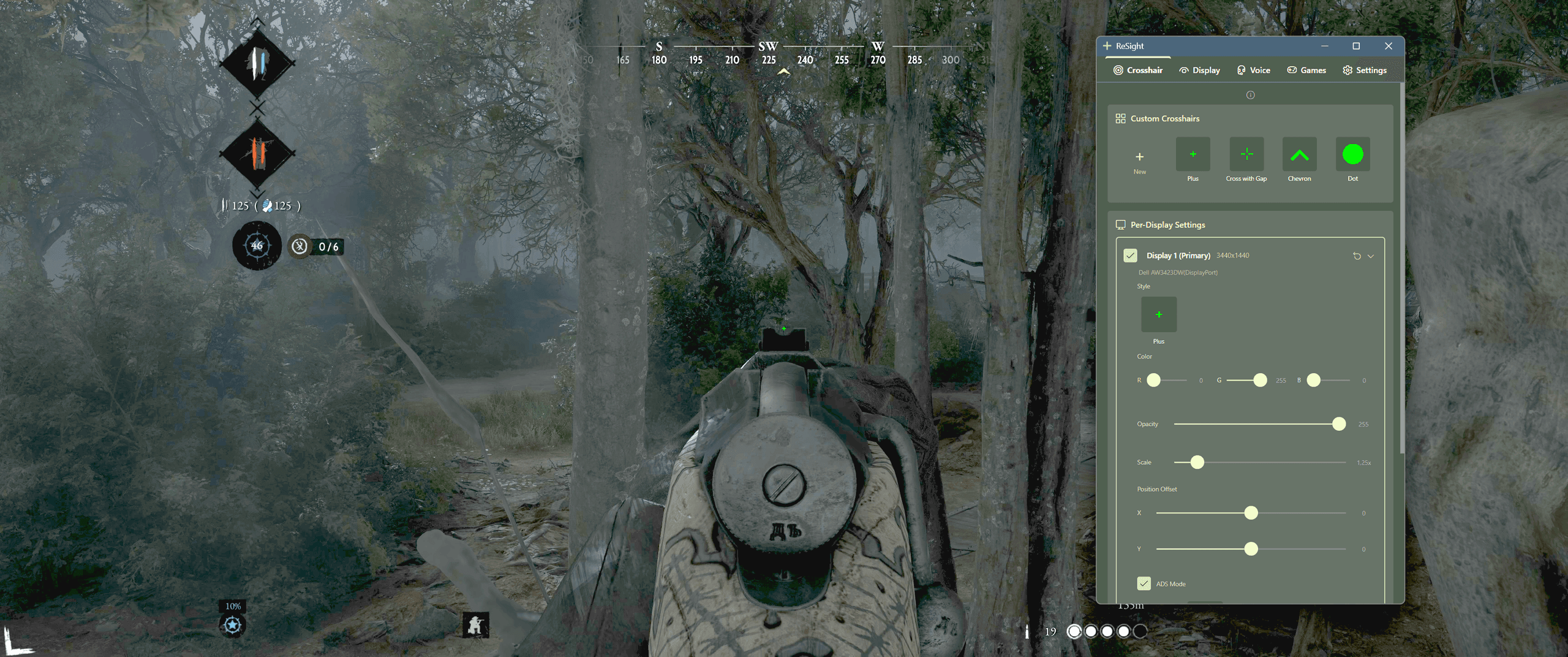
Choose which displays show a crosshair. Set color, opacity and size, then adjust horizontal and vertical offsets for the position you need.
Choose another crosshair style and scale for aiming down sights, with optional separate color, opacity and position. ADS responds to right-click with hold or toggle mode.
Save crosshair and display presets, then assign them to games. Your assigned preset applies when that game is in focus, so you can keep different setups ready.
Windows 10/11 · Paid app · One-time purchase · No subscription
Your crosshair, display and audio controls in one place.
Choose your crosshair’s color, size and position. Draw your own design or import PNG/SVG images.
Adjust brightness, contrast and gamma per monitor. Digital Vibrance and NVIDIA local tone require NVIDIA.
NVIDIA local tone requires a display driven by NVIDIA, SDR (HDR off), a borderless game and the installed optional component. Standard gamma adjustments use Windows display functions; HDR, drivers and the game’s display mode may limit their effect.
Save crosshair and display settings per game. Your assigned profile applies when the game is in focus.
Lower Discord volume with a hotkey when you need to hear the game more clearly.
One-time purchase. Lifetime access. No subscriptions or hidden fees.
ReSight is designed to enhance your gaming experience through improved visual clarity and convenience features. We believe in fair play—this tool is not intended to provide unfair advantages. Please use responsibly and in accordance with each game's terms of service. We are not liable for any consequences resulting from use.
Got questions? We've got answers. Find what you need below.
Look for a crosshair you can see clearly without covering your target, adjustable color and size, position controls and profiles for different games. ReSight includes these controls, a custom crosshair editor and PNG/SVG imports on Windows. Choose based on your game’s rules and display mode; no overlay is the best fit for every game.
Yes. Choose a crosshair design, create one in the pixel editor or import a PNG or SVG image. Adjust its color, size, opacity and position, then save it in your crosshair gallery. You can use separate settings when aiming down sights.
Game-specific crosshair codes belong in that game’s own settings. ReSight uses a separate on-screen crosshair: choose a design, draw in its pixel editor or import a PNG or SVG image. It does not import native VALORANT or CS2 crosshair codes.
ReSight is a Windows screen overlay. This page shows examples from Hunt: Showdown and local PvE in Escape from Tarkov. The game overview groups other shooters by crosshair needs; it is not a tested compatibility list. Check the game’s current rules and display mode.
ReSight is a Windows screen overlay. Start with Borderless Windowed mode, check that the intended monitor and crosshair are enabled, and check your assigned game profile. The global toggle is F7 by default and can be changed in Settings. If a game blocks external overlays, use its native crosshair options.
ReSight is a paid Windows app with a one-time purchase and no subscription. The license includes crosshair customization, display adjustments, Discord volume control and game profiles. See the current price in the pricing section.
ReSight is a screen overlay application that doesn't inject into games or modify game files. However, always check your game's terms of service as policies vary between games and anti-cheat systems.
Each license is activated on one machine. If you need to move your license to a new computer, you can contact support to have your activation reset. For support questions, you can also message the admins in our Discord. Join our Discord
Press a hotkey to instantly lower your teammates' voice chat volume during intense moments. Press again to restore it. Great for clutch situations where you need to focus.
After initial activation, ReSight works completely offline. No internet connection is required for day-to-day use.
Brightness, contrast and gamma use Windows display functions and are not restricted to NVIDIA. Digital Vibrance and NVIDIA local tone require NVIDIA; local tone also requires SDR, a borderless game and the installed optional component.
May we use Google Analytics and OpenAI cookies to measure visits and purchases? This is optional and does not affect your purchase. Privacy policy